Tracking Player Payments: Spreadsheet vs Dedicated Tools
"Did Liam's parents pay for the tournament?" If you've ever stared at a spreadsheet trying to answer that question, this post is for you.
Every football club — from a 10-player youth team to a 60-player academy — deals with money. Membership fees, tournament entries, kit purchases, field rentals, equipment costs. Someone has to track it all.
Most clubs start with a spreadsheet. And honestly? For a while, it works. But there's a tipping point where the spreadsheet starts causing more problems than it solves.
Let's break down when a spreadsheet is enough, when it's not, and what to look for in a dedicated tool.
When a Spreadsheet Works Fine
If your club meets these criteria, a Google Sheet or Excel file is probably sufficient:
- Under 15 players
- One person handles all finances
- Simple fee structure (one annual fee, no per-event charges)
- No expense splitting (you don't allocate costs back to players)
- Parents don't need direct access to their balance
A basic spreadsheet setup:
Player | Annual Fee | Paid | Date | Balance |
|---|---|---|---|---|
Liam | €200 | €200 | Jan 15 | €0 |
Sofia | €200 | €100 | Feb 1 | -€100 |
This is clear, simple, and free. For small clubs, it's perfectly fine.
When the Spreadsheet Breaks Down
Here's where things go wrong — usually around the 15-20 player mark or when your fee structure gets more complex:
Problem 1: Multiple payment types
Players pay for different things at different times: monthly membership, tournament fees, equipment, trips. Your simple two-column sheet becomes a multi-tab monster.
Problem 2: Expense allocation
You rent a pitch for €100/month. That cost should be split across 20 players (€5 each). Now you need formulas. When a player joins mid-month, you need to adjust the formulas. When someone leaves, more adjustments.
Problem 3: No audit trail
Who entered that €50 payment? When? Was it for membership or the tournament? Spreadsheets don't track who edited what (Google Sheets has version history, but it's not practical for auditing).
Problem 4: Parent inquiries
"How much do we owe?" Parents ask this constantly. Your options:
- Open the spreadsheet, find their row, reply manually (every time)
- Share the whole sheet (now everyone sees everyone's finances)
- Create individual sheets per family (nightmare to maintain)
Problem 5: Human error
One mistyped formula, one accidentally deleted row, one overwritten cell — and your numbers are wrong. You won't know until end-of-season reconciliation reveals a €300 gap.
Problem 6: Multiple teams
If you manage U-12 and U-16 teams with different fee structures, your spreadsheet complexity doubles. Separate sheets? Separate files? Both are hard to maintain.
What a Dedicated Tool Gives You
A proper club finance tool doesn't need to be complex. It just needs to solve the six problems above:
Feature | Spreadsheet | Dedicated Tool |
|---|---|---|
Record payments | Manual entry | Structured form with categories |
Track expenses | Manual entry | Allocated to players automatically |
Player balance | Formula (fragile) | Auto-calculated |
Audit trail | Limited | Every entry tracked with author & date |
Parent access | Share whole sheet or manual replies | Restricted view — parents see only their child |
Multi-team | Separate sheets | One dashboard, filter by team |
Error-proof | Easy to break | Data validated, no formula drift |
The key benefit isn't any single feature — it's that the balance per player is always correct and always accessible. No formulas to maintain, no manual reconciliation.
What to Look For
If you're evaluating tools for your club's finances, here's what actually matters:
Must-haves:
- Record player payments with date, amount, and category
- Record expenses with optional allocation to players
- Automatic balance calculation per player
- Know who entered each transaction
- Works on mobile (you'll record payments pitch-side)
Nice-to-haves:
- Filter by payment category (membership vs. tournament vs. equipment)
- Export to CSV/PDF for your club's records
- Restricted access so parents see only their own balance
- Multi-team support with separate or combined views
Don't need:
- Full accounting software (you're not a business)
- Invoicing (most clubs don't invoice parents)
- Tax reporting (unless your club is a registered charity)
The Real Cost of "Free"
Spreadsheets are free in terms of software cost. But they cost you time:
- 30 minutes per week maintaining formulas and chasing data
- 2-3 hours per month answering parent payment questions
- Several hours at end-of-season trying to reconcile numbers
- Stress from knowing the numbers might not be accurate
That's roughly 8-10 hours per month for a mid-sized club. A tool that saves even half of that is worth considering — especially if it has a free tier.
How KickPilot Handles Club Finances
KickPilot's finance module was built specifically for this use case:
- Player payments: Record any payment with category (membership, tournament, equipment, trip), date, amount, and notes
- Expenses: Record club expenses and optionally split them across players
- Auto-calculated balances: Every player's balance updates automatically — no formulas, no maintenance
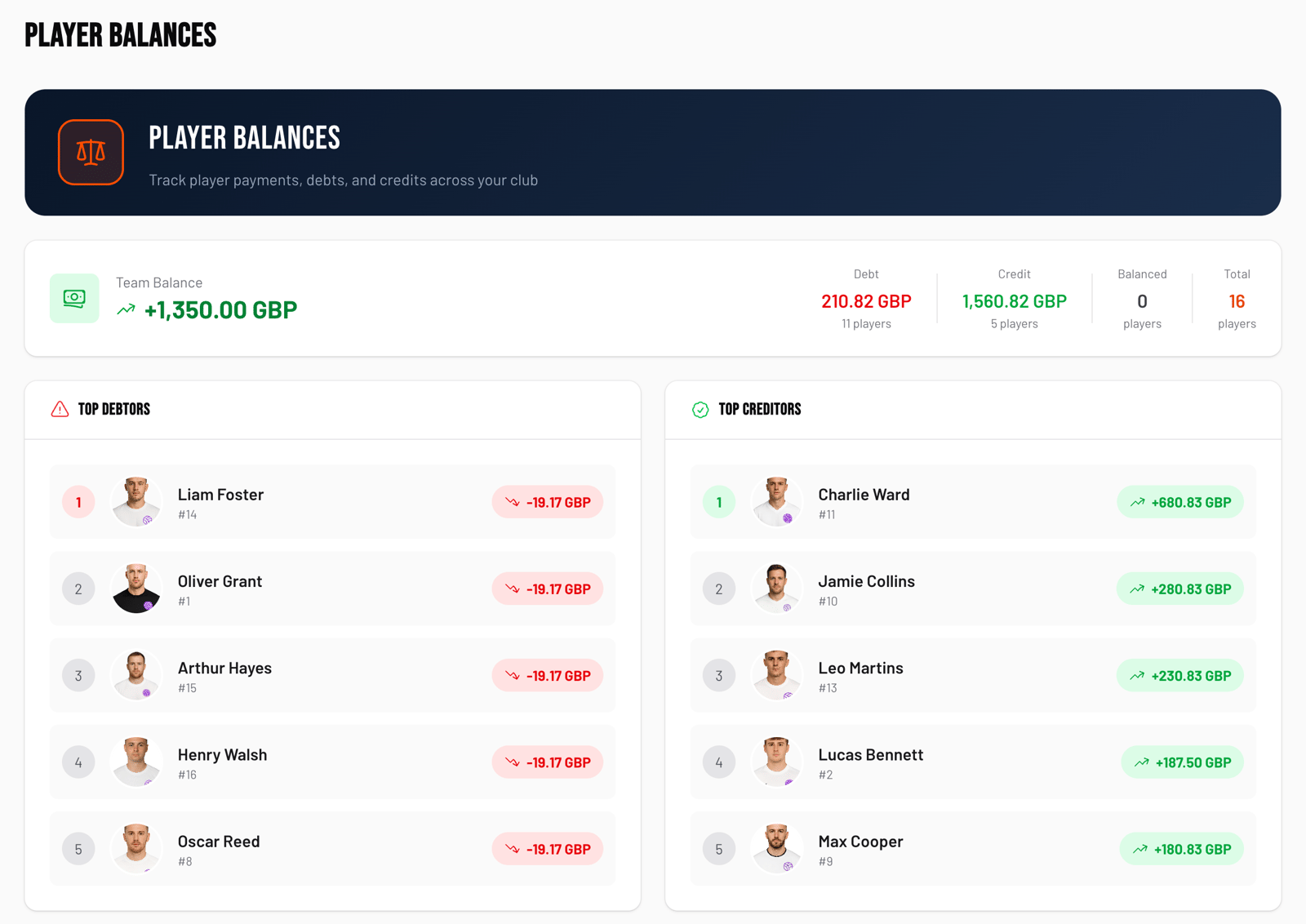
- Balance dashboard: See team balance, top debtors, top creditors at a glance
- Audit trail: Every entry shows who created it and when
- Parent access: Parents with restricted access see only their child's financial info
It's free for up to 15 players. No spreadsheet formulas required.
Making the Switch
If you're currently using a spreadsheet and want to switch:
1. Don't migrate historical data — start fresh from the current balance. Record each player's starting balance as of today.
2. Pick a cutoff date — "From March 1st, all payments go into the new system"
3. Keep the old spreadsheet as an archive — don't delete it
4. Tell parents — "You'll be able to see your balance online now" (they'll love this)
The transition takes one session. The time savings start immediately.
CTA: Ready to ditch the spreadsheet? [Try KickPilot free](https://kickpilot.me/) — finances included on all plans.